Data residency and rights
Administrator·5 minutes to read
Every control this page describes is visible only to an owner or an administrator; the rights section is a member's own, exercised from their own account.
What this does for you
This page explains residency as something the system enforces on every model call, how long each kind of record is kept, and how a member's own request to see or erase their data is answered.
Before you start
- You know your organisation's residency policy — EU/EEA only, EU/EEA first or Anywhere a route requires — set on Organisation → Policies (covered on the Organisation policies page).
- For a self-hosted deployment, you can run a command on the machine the product runs on; the hosted service instead answers a member's own request from their account.
Steps
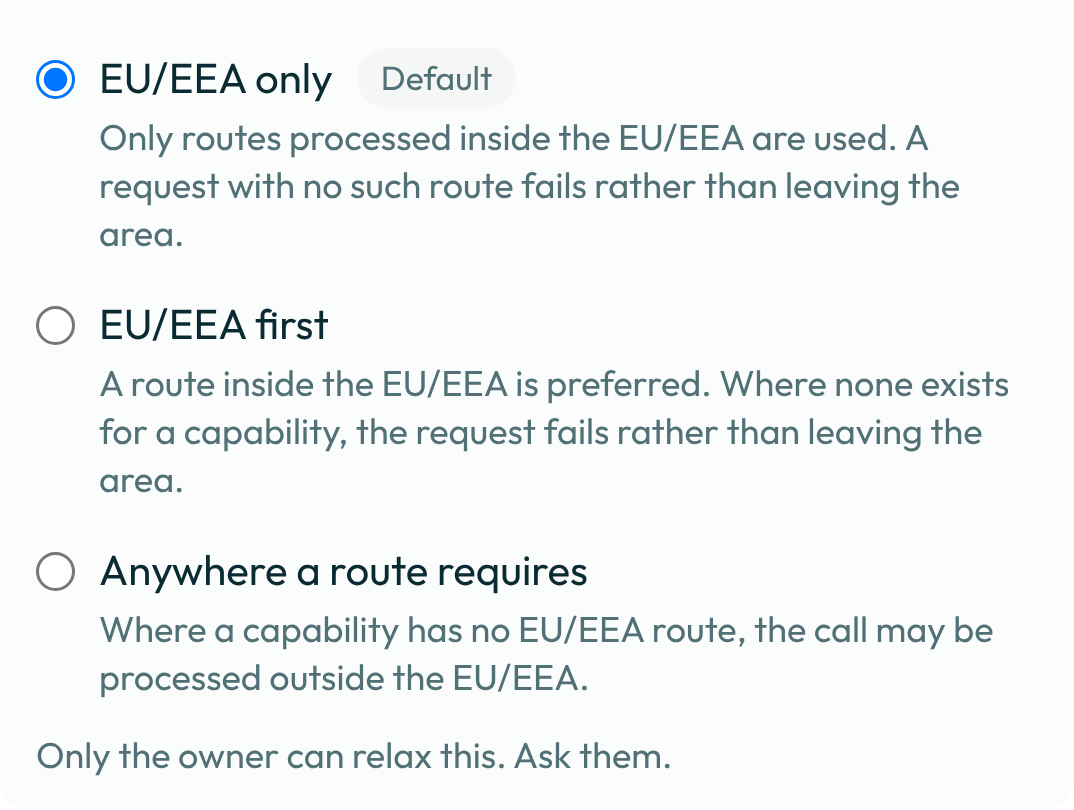
- Treat residency as an enforced filter, not a promise in copy. Every model call is resolved
against the routes your policy admits —
EU/EEA onlyadmits only a route guaranteed inside the EU/EEA or run on your own machine;EU/EEA firstalso admits an EU/EEA-inference route;Anywhere a model requiresadmits every model. A call with no admitted model fails outright rather than using one outside the policy.

-
Look up how long a kind of record is kept. Each kind of record kept on a schedule carries a floor your organisation cannot shorten, a default, and a ceiling it cannot exceed. A message, an attachment or a reaction is kept for a default of 730 days (floor 30, ceiling 2,555); the audit log for a default of 365 days (floor 180, ceiling 730); a run's own event ledger for a default of 90 days (floor 30, ceiling 365); the record that an AI disclosure was shown on an outward message for a default of 365 days (floor 180, ceiling 1,825). Deleting your account is always available regardless of any one kind of data's own schedule.
-
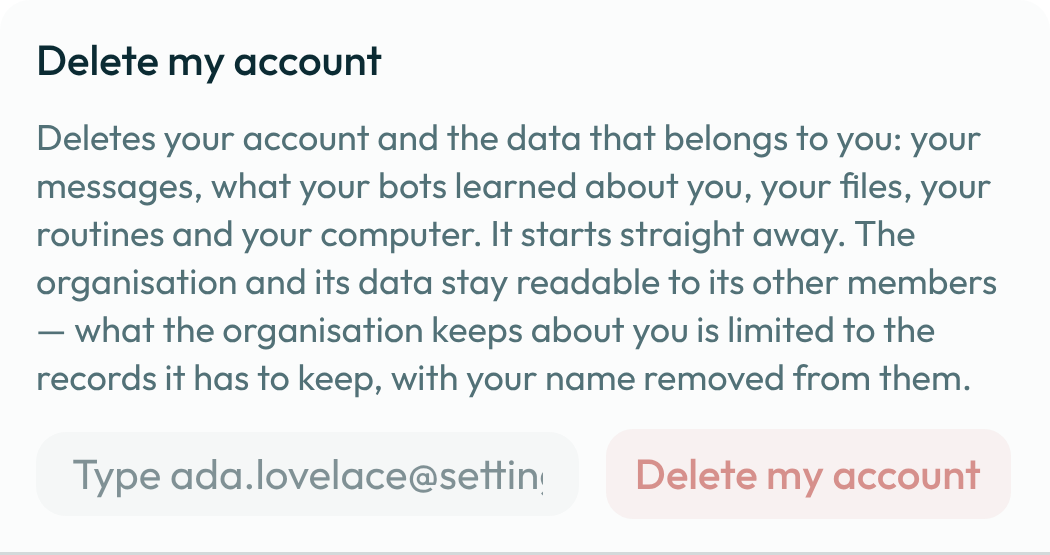
On Settings → General, a member exercises their own rights:
Delete my accountremoves and overwrites their own rows without a grace period, and is available whatever their role. A deletion does not destroy the organisation's own encryption key — that key is shared by every member of the organisation, so destroying it to answer one member's request would make every other member's data unreadable — so a record another member's own action refers to (an audit-log or run-event entry naming the erased member, for example) is stripped of the member's identity rather than shredded, and stays technically decryptable under the organisation's key. On a self-hosted deployment the same rights run from the command line asbotseon privacy exportandbotseon privacy erase, documented in full on the privacy command reference.
- Read the imprint for who to write to about a right this page does not cover, and know what this product does not claim: no certification is held or claimed, and the residency wording above is the only residency wording this product uses anywhere — no stronger synonym for it appears in its copy or its documents. The imprint page itself is not live on this deployment yet, so there is no screen to show for this step.
AI disclosure and generated pictures
Nothing here can be switched off by a setting, a bot or a member.
- Every outward message says it was written by a bot. A message a bot sends outside your organisation — an e-mail, a calendar note, a ticket reply — carries one sentence naming the bot. A public post does too: a bot's post or thread reply in a public channel, and a comment on an issue or ticket that everyone following it reads, end (or, for a connector tool, start) with that same sentence, and a post with buttons or sections carries it as a visible line under them. Each disclosure shown is recorded on the schedule in step 2.
- Every generated picture carries its provenance inside the file. A picture a bot generates,
and a diagram it draws, is stored with an embedded XMP record: the standard IPTC
digital-source-type mark (
trainedAlgorithmicMediafor a model's picture,algorithmicMediafor a drawn diagram), the model or renderer that made it, when, and a fingerprint of the request — never the request's words. The mark travels with the file when it is downloaded, forwarded or reposted, and photo viewers and platforms that read IPTC metadata show it as machine-generated. A picture in a format that cannot carry the mark is refused rather than stored unmarked.
A worked example
Exporting one member's own data from the command line, on a self-hosted deployment:
botseon privacy export --org <orgId> --user <userId> --actor <actorId> --out export.json
What can go wrong
| What you see | Why | What to do |
|---|---|---|
Only the owner can relax this. Ask them. | You are an administrator, not the owner, and tried to widen the residency policy to Anywhere a model requires. | Ask the owner to make the change, or have them promote you to owner first. |
Type the organisation’s name to confirm this change. | You chose Anywhere a model requires without typing the organisation's name. | Type the organisation's name exactly as it is spelled, then confirm. |
Could not do that. Try again. | The generic refusal for a rights request the server could not complete on the first attempt. | Try again; if it keeps failing, use the command-line path instead. |
See also
Last verified against build c0f77aa.